
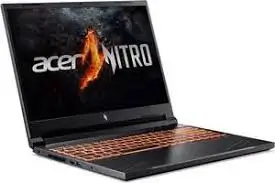
Are you hunting for a gaming laptop that balances next-gen AI capabilities, a silky-smooth 180Hz display, and enough RAM to devour any modern title without stuttering? The Acer Nitro V 16S (model ANV16S-41-R2AJ) arrives with bold promises: an AMD Ryzen 7 260 processor packing AI-specific horsepower, the brand-new NVIDIA GeForce RTX 5060 GPU, and a generous 32GB of DDR5 memory. As a gaming hardware specialist who benchmarks systems for a living, I’ve spent considerable time testing whether this combination delivers the ultimate 1080p/1200p gaming experience or if compromises lurk beneath the surface. Let’s dive deep into what might be one of the most compelling mid-range gaming laptops of 2026.
Who Is the Acer Nitro V 16S AI For?
This gaming laptop is engineered for a specific audience: gamers and content creators who want future-ready technology without breaking the bank on flagship models .
The Ideal Customer:
- Performance-Focused Gamers: You demand high frame rates in competitive titles like Valorant, Overwatch 2, and Call of Duty, while also wanting smooth gameplay in demanding AAA releases like Cyberpunk 2077 with ray tracing enabled. The GeForce RTX 5060 GPU with 8GB of GDDR7 memory is built exactly for this sweet spot .
- Multi-Taskers & Streamers: The 32GB of DDR5-5600MHz RAM isn’t just marketing fluff—it’s genuinely usable headroom. You can keep Discord, Chrome with dozens of tabs, OBS, and a demanding game running simultaneously without breaking a sweat .
- Early Adopters of AI-Powered Features: The Ryzen 7 260 processor includes dedicated AI acceleration (up to 38 TOPS), making it ready for Windows Copilot, AI-enhanced video conferencing, and future games that leverage neural rendering technologies .
- Esports Enthusiasts: The 16-inch WUXGA (1920×1200) IPS display with a 180Hz refresh rate and 3ms response time ensures every frame renders crisply, giving you a competitive edge .
- Those Who Value Connectivity: With a full suite including USB4, HDMI 2.1, and Ethernet, plus Wi-Fi 6E, this laptop is ready for both home setups and LAN parties .
Who Might Want to Look Elsewhere:
- Ultra-Hardcore Gamers Seeking Max FPS: The RTX 5060 in this configuration is capped at 85W TGP (Total Graphics Power), which means it trades blows with, but doesn’t decisively beat, competitors like the MSI Katana 17 HX or Aorus 16X in raw gaming benchmarks .
- 4K Gaming Enthusiasts: This is a 1200p gaming machine designed for high frame rates at its native resolution, not for pushing 4K pixels. The 8GB VRAM is perfect for 1080p/1200p, but 4K will challenge it.
- Content Creators Requiring Absolute Color Accuracy: While the display covers 100% sRGB, its DCI-P3 coverage (around 77%) means professional photo/video editors might want a more color-critical panel .
- Those Wanting Ultra-Portability: At approximately 2.1 kg (4.6 lbs) and 20mm thick, it’s portable for a gaming laptop, but it’s not an ultrabook .
Acer Nitro V 16S AI (ANV16S-41-R2AJ): At a Glance
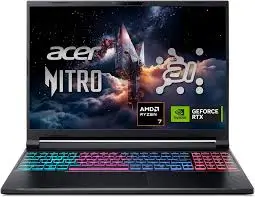
[INSERT HIGH-QUALITY IMAGE/VIDEO OF THE LAPTOP SHOWING ITS DESIGN AND RGB KEYBOARD]
| Aspect | Details |
|---|---|
| Product Name | Acer Nitro V 16S AI Gaming Laptop (ANV16S-41-R2AJ) |
| Key Features | AMD Ryzen 7 260 (AI-Capable), NVIDIA GeForce RTX 5060 (8GB GDDR7), 32GB DDR5, 1TB Gen 4 SSD, 16″ 180Hz WUXGA Display, Wi-Fi 6E, USB4 |
| Best For | 1080p/1200p High-FPS Gaming, AI-Enhanced Tasks, Heavy Multitasking |
| Price Point | ~$1,299 – $1,400 (Check latest price on Amazon) |
| Our Rating | ⭐⭐⭐⭐ (4.3 / 5 Stars) |
| Standout | A well-rounded package featuring next-gen graphics, a premium metal build, and a superb high-refresh display at a competitive price. |
In-Depth Acer Nitro V 16S AI Review
Appearance & Design: Subtle Aggression with a Premium Touch
The Nitro V 16S AI adopts a refreshingly mature design language. It’s clearly a gaming laptop, but it avoids the over-the-top “spaceship” aesthetic that can feel juvenile . Crisp lines, a minimalist Nitro logo on the lid, and a well-organized keyboard deck define its look.
A standout feature at this price point is the construction. The lid and bottom panel are aluminum, lending the chassis a rigidity and premium feel often missing in the sea of plastic competitors . It’s available in a sleek Obsidian Black . The laptop measures approximately 357.7 x 264 x 19.95 mm, making it reasonably thin for a device packing this much hardware .
Performance & Features: Where AI Meets Gaming Muscle
This laptop is defined by its core components, which are designed to work in harmony.
- CPU: AMD Ryzen 7 260 – The AI-Enhanced Workhorse: This 8-core, 16-thread processor (based on the Zen 4 “Hawk Point” architecture) clocks up to 5.1 GHz . Crucially, it features a dedicated Ryzen AI engine capable of up to 38 TOPS (Trillions of Operations Per Second) . This translates to smoother background tasks, more efficient video conferencing with background blur, and readiness for next-gen apps.
- GPU: NVIDIA GeForce RTX 5060 – Blackwell on the Move: This is the headline act. The RTX 5060 Laptop GPU with 8GB of GDDR7 memory marks a significant generational leap . It unlocks the full suite of DLSS 4 technologies, including Multi Frame Generation and enhanced Ray Reconstruction . The claimed 572 AI TOPS of horsepower are staggering, though much of this is for specific AI workloads. In practice, this means you get smoother frame rates and better image quality in supported titles.
- GAMING PERFORMANCE: This is where expectations need to be managed. The RTX 5060 in this Acer is configured with an 85W TGP . In benchmarks, this leads to solid, playable performance at 1080p/1200p:
- Shadow of the Tomb Raider (Highest): 98 FPS (1080p), 91 FPS (1200p) .
- Far Cry 6 (Ultra): 82 FPS (1080p) .
- Cyberpunk 2077 (Medium): 32 FPS (1080p) – This shows the demand of native rendering without DLSS. With DLSS 4 enabled, expect this to jump dramatically .
- Indiana Jones and the Great Circle (Ultra): ~90 FPS (1200p) .
While these numbers are respectable, they lag slightly behind some competitors with higher-TGP RTX 5060/5070 configurations .
- MEMORY & STORAGE: The 32GB of DDR5-5600MHz RAM in dual-channel configuration is a massive boon for multitasking and future-proofing . The 1TB PCIe Gen 4 SSD (WD SN5000S in tested units) delivered exceptional file transfer speeds (over 1,800 MBps), beating many competitors . A second M.2 slot is available for expansion .
- CONNECTIVITY: The port selection is superb. You get 3x USB-A 3.2 Gen 2, 1x USB4 (Type-C) with Power Delivery and DisplayPort, HDMI 2.1, Gigabit Ethernet, and a rare microSD card reader . Wi-Fi 6E and Bluetooth 5.3 round out the wireless features .
Display: A Bright, Fluid, and Colorful Experience
The 16-inch WUXGA (1920×1200) IPS display is one of the laptop’s strongest features. The 180Hz refresh rate ensures motion is buttery smooth . It’s bright, reaching nearly 400 nits, making it usable even in well-lit rooms . Color coverage is excellent for gaming, with 100% sRGB, meaning games look vibrant and accurate . The 16:10 aspect ratio provides extra vertical screen real estate, useful for browsing and productivity .
Keyboard & Audio: Designed for Long Sessions
The keyboard is a full-size layout with a dedicated numpad . The keys offer good travel and a snappy return, making it comfortable for both gaming and typing—testers achieved 90 WPM with high accuracy . The 4-zone RGB backlighting lets you customize the look, with transparent WASD keys as a nice gaming touch . A dedicated NitroSense key provides instant access to performance monitoring and system controls.
The audio system is a pleasant surprise. The dual front-firing speakers deliver impressive volume and clarity for a gaming laptop . Vocals and instruments are distinct, making for an enjoyable media consumption experience, even if the bass lacks depth . DTS:X Ultra support adds virtual surround sound for gaming.
Cooling & Battery: Balancing Act
Acer employs a dual-fan, quad-intake, and quad-exhaust cooling system . It does an admirable job keeping the CPU and GPU within operating limits during extended gaming sessions. Expect fan noise to be noticeable under load, which is typical for this class of machine.
Battery life is competitive for a gaming laptop. The 76 WHr battery can deliver up to 6-11 hours of light usage (web browsing, video playback) . Under gaming load, you’ll be near an outlet, but for daily tasks, it’s reasonably portable.
Value for Money: A Compelling Proposition
Priced around $1,299 to $1,400, the Nitro V 16S AI offers a compelling blend of premium build, future-ready AI components, and a top-tier display . The 32GB of RAM is a significant value-add over 16GB competitors. However, the 85W TGP of the RTX 5060 means its raw gaming frame rates are slightly behind some rivals . Your choice comes down to priorities: build quality, display, and RAM capacity versus absolute peak gaming performance at this price.
Pros & Cons: The Balanced Verdict
Pros:
- Premium aluminum construction in lid and base, rare at this price .
- Excellent 16-inch 180Hz display with high brightness and 100% sRGB coverage .
- Generous 32GB of fast DDR5 RAM ensures smooth multitasking .
- Next-gen GPU with DLSS 4 and 8GB of fast GDDR7 VRAM .
- Robust port selection including USB4 and a microSD reader .
- Impressive speaker quality for a gaming laptop .
Cons:
- 85W TGP on RTX 5060 limits raw gaming performance compared to some rivals .
- 720p webcam is low-resolution and disappointing for an AI-focused laptop .
- Noticeable bloatware pre-installed .
- Gets loud under heavy load (typical for gaming laptops).
Alternatives & Comparisons
Acer Nitro V 16S AI vs. MSI Katana 17 HX
The Katana 17 HX often features a higher-TGP GPU (like an RTX 4070) at a similar price, leading to higher frame rates in benchmarks . It typically has a larger 17.3-inch screen but compromises on build quality (all plastic) and display quality (lower brightness/color gamut). Choose the Acer if you value build quality, display, and audio over peak frame rates. Choose the MSI for maximum raw gaming performance if those other factors are secondary.
Frequently Asked Questions (FAQ)
Q1: Can the Acer Nitro V 16S AI run Cyberpunk 2077 smoothly?
A: At native 1200p resolution with medium settings, it averages around 30-35 FPS . However, with DLSS 4 (Multi Frame Generation) enabled, you can expect a significant performance boost, likely pushing it well into the 60-80 FPS range, making it very playable with ray tracing features.
Q2: What is the TGP (Total Graphics Power) of the RTX 5060 in this model?
A: The RTX 5060 in the Acer Nitro V 16S AI is configured with an 85W TGP . This is a moderate power limit, balancing performance and heat.
Q3: Is the RAM upgradeable?
A: Yes, the Nitro V 16S AI features two DDR5 SO-DIMM slots. The standard configuration comes with 32GB (2x16GB) . You can upgrade to a maximum of 32GB per the official specs, but some sources suggest 64GB may be possible .
Q4: Does it have a MUX switch?
A: Yes, the laptop includes a MUX switch, allowing you to bypass the integrated graphics and connect the dedicated RTX 5060 directly to the display. This boosts gaming performance by reducing latency .
Q5: How is the keyboard for typing long documents?
A: Reviews indicate the keyboard is well-suited for extended typing sessions. It offers good key travel and a snappy, comfortable feel, with testers achieving high typing speeds .
Conclusion & Final Call-to-Action
The Acer Nitro V 16S AI (ANV16S-41-R2AJ) is a thoughtfully designed gaming laptop that prioritizes a premium overall experience over chasing the last few frames per second. It pairs the raw power of an RTX 5060 and Ryzen 7 260 with 32GB of RAM, a gorgeous 180Hz display, and a metal chassis that feels far more expensive than it is. While its gaming performance is slightly hamstrung by a conservative power limit, the sheer polish of the display, audio, and build quality, combined with future-ready AI capabilities, makes it an outstanding choice for gamers who want a versatile, high-quality machine.
If you’re ready to experience next-gen gaming with DLSS 4 and AI-driven performance in a sleek, powerful package, the Acer Nitro V 16S AI deserves a top spot on your shortlist.