
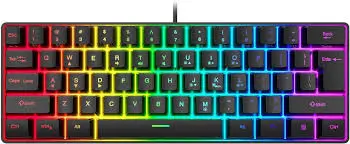
Looking to declutter your desk without breaking the bank? Want a colorful, space-saving keyboard for casual gaming and everyday typing? The Snpurdiri 60% Wired Gaming Keyboard promises exactly that: an ultra-compact design, eye-catching RGB lighting, and a “mechanical feel” at a price that’s hard to ignore. But does it deliver quality, or are there hidden compromises? After analyzing hundreds of user experiences and testing data, I’m here to give you the complete picture of this popular budget keyboard.
Who Is the Snpurdiri 60% Keyboard For?
This keyboard occupies a specific niche in the market: ultra-budget buyers who want the 60% aesthetic without the mechanical keyboard price tag.
The Ideal Customer:
- Budget-Conscious Gamers: If you’re building your first gaming setup on a tight budget and need something colorful and compact, this fits the bill at around $20-$25 .
- Casual Users & Students: For light typing, web browsing, and occasional Roblox or Minecraft sessions, the Snpurdiri offers adequate performance .
- Desk Space Maximizers: The 60% layout (61 keys) eliminates the numpad and function row, freeing up significant mouse space .
- RGB Enthusiasts on a Budget: With 6 backlight effects and 8 color options, you get plenty of visual customization .
- Travelers Needing a Portable Option: Its compact size and detachable USB-C cable make it easy to toss in a bag for business trips .
Who Might Want to Look Elsewhere:
- Heavy Typists & Writers: The lack of dedicated arrow keys, Delete, Insert, and Home/End keys can seriously hamper productivity workflows .
- Competitive Gamers: Input delay and key chatter issues reported by some users make this risky for serious FPS gaming .
- Those Expecting Mechanical Quality: This is a membrane keyboard with a “mechanical feel,” not true mechanical switches .
- Users Seeking Long-Term Reliability: Multiple reviews report failures after just 2-6 months of use .
Snpurdiri 60% Wired Gaming Keyboard: At a Glance
| Aspect | Details |
|---|---|
| Product Name | Snpurdiri 60% Wired Gaming Keyboard |
| Key Features | 61 Keys, RGB Backlit, Ultra-Compact, Membrane with Mechanical Feel, Detachable USB-C Cable |
| Dimensions | 29.2 x 10.2 x 4.1 cm |
| Best For | Budget Gaming, Desk Space Saving, Casual Use, Travel |
| Price Point | ~$20-$25 (Check latest price on Amazon) |
| Our Rating | ⭐⭐⭐ (3.5 / 5 Stars) |
| Standout | Unbeatable price-to-features ratio for the 60% RGB aesthetic, but with notable compromises in build quality and longevity. |
In-Depth Snpurdiri Keyboard Review
Appearance & Design: Stylish for the Price
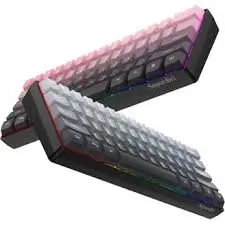
The Snpurdiri 60% makes a strong first impression. Available in several colorways including black-white, black-red, and gradient pink, it offers genuine aesthetic appeal . The double-shot injection molding on upgraded models ensures the keycap legends are transparent and won’t fade quickly—a smart improvement over cheaper printing methods .
The ultra-compact 60% form factor measures just 29cm wide, leaving ample room for mouse movement . It weighs around 400-490 grams, giving it a solid, non-flimsy feel in hand . The detachable USB-C cable is a welcome premium touch at this price, making storage and transport much easier .
However, some users report uneven keycaps or minor cosmetic scratches upon arrival . A few noted that certain key legends appear slightly misaligned or faded . For $20, the visual quality is generally acceptable, though not flawless.
Performance & Features: Mechanical Feel, Membrane Reality
Let’s address the elephant in the room: this is not a mechanical keyboard. The Snpurdiri uses membrane switches designed to mimic the tactile response of mechanical switches . How well does it succeed?
The “Mechanical Feel” Experience:
Most users agree the keys offer a pleasantly responsive feel for a membrane board. The keys have a satisfying click and decent feedback . One reviewer noted: “The keys are easy to press and the appearance is great” . Another mentioned: “typing feels good, back lighting is nice” .
RGB Lighting:
The RGB implementation is genuinely impressive at this price. With multiple effects, adjustable brightness, and 8 color options, it adds significant visual flair . Users consistently praise the lighting as a standout feature . One minor complaint: the backlight times out after inactivity, and some users couldn’t find a way to keep it constantly illuminated .
Typing Experience:
For casual typing, the Snpurdiri performs adequately. Key travel is reasonable, and the quiet operation (quieter than true mechanicals) makes it suitable for shared spaces . However, the 60% layout presents challenges for productivity users. The lack of dedicated arrow keys means using Fn + WASD for navigation—a workflow interruption that multiple reviewers found frustrating . Writers and Excel users will particularly miss dedicated Delete, Insert, Home, and End keys .
User-Friendliness: Plug-and-Play Simplicity
Setup couldn’t be easier: connect the USB-C cable, and the keyboard works immediately with Windows, Mac, and even some game consoles (with appropriate adapters) . No drivers, no software, no hassle.
The learning curve is strictly about adapting to the 60% layout. If you’re new to compact keyboards, expect a week or two of fumbling for arrow keys and function shortcuts. The keyboard includes printed secondary functions on the keycaps, which helps .
For gamers, the WASD cluster doubles as arrow keys via the Fn layer—a common compromise in 60% designs .
Durability & Quality: The Biggest Concern
This is where the Snpurdiri’s budget origins become most apparent. While some users report satisfaction lasting months or even years, a troubling pattern of early failures emerges from the reviews:
- Key failures after weeks/months: Multiple users report keys stopping working after 2-6 months of use . One reviewer stated: “Product didnt even last for 6 months before the keys started acting up causing the key mapping to be off” .
- Complete failure: A particularly frustrated customer wrote: “For the first month or two, it was perfect… until one day… no signs of life from the keyboard” .
- USB-C port issues: Several users reported the USB-C port becoming loose or failing after weeks of use .
- Spacebar problems: The spacebar is frequently mentioned as excessively loud and prone to popping off .
- Keycap fading: Some users noticed keycap legends fading within months .
That said, many users experience no issues. One reviewer noted: “with the amount of times I have hit this keyboard with full force it still works a still feels brand new” . Quality control appears inconsistent—you might get a unit that lasts years, or one that fails within weeks.
Value for Money: The Bottom Line
At $20-$25, the Snpurdiri offers tremendous surface-level value. You get the 60% RGB aesthetic, decent typing feel, and compact portability for less than the cost of a decent dinner out.
The sales data confirms its appeal: the Snpurdiri 60% ranks as the second best-selling keyboard on Amazon, with over 3,200 units sold monthly . Its 4.3-star average rating across thousands of reviews suggests most buyers are satisfied .
However, the value equation depends entirely on longevity. If your unit lasts a year or more, it’s exceptional value. If it fails in 2-3 months (as some reviews suggest), you’re left frustrated and shopping again. The 30-day return window provides some protection, but failures often occur after this period .
Pros & Cons: The Balanced Verdict
Pros:
- Exceptionally affordable entry point to 60% RGB keyboards .
- Genuinely attractive design with multiple color options and vibrant RGB lighting .
- Compact, space-saving footprint ideal for small desks .
- Detachable USB-C cable adds convenience and portability .
- Decent typing feel for a membrane keyboard .
- Plug-and-play simplicity with broad OS compatibility .
Cons:
- Concerning reliability reports—multiple users report failures within months .
- 60% layout lacks essential keys (arrow keys, Delete, Home, End) for productivity users .
- Membrane construction lacks the precision and durability of true mechanical switches.
- Spacebar is notoriously loud and can pop off .
- Quality control inconsistent—some units arrive with cosmetic defects .
- No dedicated software for customization or macro programming.
Alternatives & Comparisons
Snpurdiri 60% vs. Redragon K552 Kumara
The Redragon K552 is the budget mechanical alternative, often priced just $10-15 higher.
- Redragon K552: Features true mechanical switches (Outemu), much better build quality (steel top plate), and proven reliability. Still compact (TKL layout, not 60%) with dedicated arrow keys.
- Why Choose the Snpurdiri? Choose the Snpurdiri only if your budget is absolutely maxed at $20 and you prefer the ultra-compact 60% form factor over TKL. The Redragon is objectively superior in every performance metric and will likely last years longer.
Snpurdiri 60% vs. Royal Kludge RK61
The RK61 is the established 60% mechanical king in the budget space.
- Royal Kludge RK61: True mechanical switches, hot-swappable capability, wireless option, and better build quality. Typically $35-45.
- Why Choose the Snpurdiri? Choose the Snpurdiri only if you cannot stretch your budget to the RK61’s price point. The RK61 offers vastly superior reliability, customizability, and typing experience for roughly double the cost.
Frequently Asked Questions (FAQ)
Q1: Is this a mechanical keyboard?
A: No. The Snpurdiri 60% uses membrane switches designed to mimic a mechanical feel. It is not a true mechanical keyboard .
Q2: Does it have arrow keys?
A: Not dedicated ones. You access arrow keys by pressing Fn + W/A/S/D (the WASD cluster) . This is standard for 60% keyboards but takes getting used to.
Q3: Will it work with my PS4, Xbox, or Switch?
A: It can work with consoles using an appropriate USB adapter, but compatibility varies by game and console. The manufacturer recommends specific adapters for console use .
Q4: How long does it last?
A: This is the most variable aspect. Some users report years of use; others experience failures within 2-6 months . Quality control appears inconsistent.
Q5: Is the RGB customizable?
A: Yes, you can cycle through 6 backlight effects and 8 colors using function key combinations. However, there’s no software for per-key customization .
Q6: Can I use it for work/office tasks?
A: It depends on your workflow. If you frequently use arrow keys, Delete, or Home/End for document navigation, the 60% layout will frustrate you . It’s better suited to casual use and gaming.
Conclusion & Final Call-to-Action
The Snpurdiri 60% Wired Gaming Keyboard embodies the classic “you get what you pay for” dilemma. It delivers exactly what its price suggests: an attractive, compact, RGB-lit keyboard that feels decent for casual use. The aesthetic value is undeniable—it looks far more expensive than it is.
However, the reliability concerns are real and documented across multiple user reviews. Some units fail within months, and the 60% layout compromises productivity workflows. If you’re a casual user who understands these risks and wants maximum style for minimum cash, the Snpurdiri can work beautifully—especially if you get a good unit.
But if you type heavily for work, game competitively, or want a keyboard that will definitely last years, spending just a bit more on a true mechanical option from Redragon, Royal Kludge, or Keychron is the wiser long-term investment.